Making games involves a surprising amount of work that has very little to do with making games.
There’s the enjoyable part: trying out ideas, getting something working on screen, and gradually turning it into something people want to play. Then there’s everything that keeps that work moving—managing projects, building releases, keeping track of versions, uploading files, checking servers, and making sure backups are there when you need them.
Each of those jobs is manageable on its own. Put them together across several projects, though, and they start taking up more attention than they should.
That’s what led me to build the Yobowargames Management Studio.
A home for the work around the games
I wanted one place where I could open the studio and get my bearings.
Which project am I working on? Where’s the latest build? Is the website responding? Are the services behind the games healthy? What’s happening with the backups?
The answers existed, but finding them meant moving between folders, development tools, websites, and server connections. It also meant remembering the little details that make a process work: which command to run, which file to use, and which step comes next.
The Management Studio brings more of that work together in a desktop application built around how I actually run Yobowargames.
Even something as simple as seeing my local game projects in one place and opening them directly in Android Studio removes a small piece of friction. It’s a modest feature, but those small interruptions add up.
Making builds easier to follow
One of the most useful parts is having a clearer build and release process.
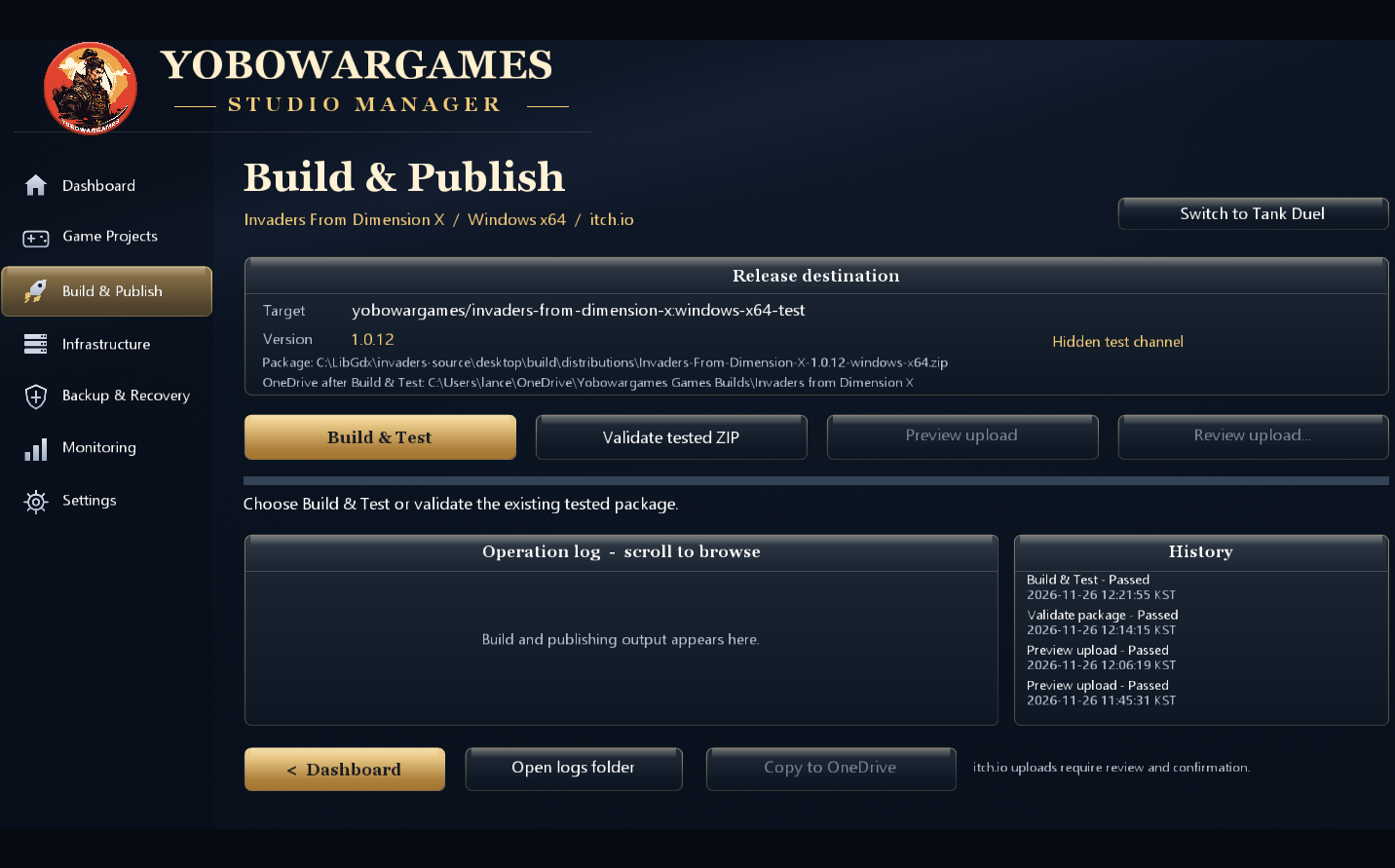
For projects with an integrated build workflow, the studio can run checks, create the Windows package, and test gameplay and saving and loading against the packaged game. It keeps a record of the process, with logs available when something needs investigating.
That gives me more confidence in the actual package I’m preparing to share. Getting a game running in the development environment is one milestone; knowing the packaged version has gone through its checks is another.
The itch.io workflow also gives me a chance to preview an upload and review the destination, version, and exact package before confirming it.
When I’m concentrating on finishing a game, having those details clearly in front of me is useful. There’s less to keep in my head and a more consistent process to follow.
Keeping builds and versions organised
Version numbers are a small detail until they disagree.
For the integrated release workflow, the version comes from one setting, which feeds through to the game, packaging, and upload version. That makes preparing an update simpler and reduces the chance of a release carrying conflicting information.
The studio also supports copying builds into the appropriate OneDrive folders, with separate build workflows for different projects. Previous builds are preserved, making it easier to keep track of what I’ve produced.
These are ordinary housekeeping jobs, but making them more consistent gives me time and attention back.
Seeing the health of the studio
Yobowargames also relies on services beyond my development machine.
The Management Studio brings checks for GitLab, the WordPress website, and Nakama into one monitoring view. I can see their reported status, when they were last checked, and more detail when something needs attention.
That means fewer separate checks just to find out whether everything is responding.
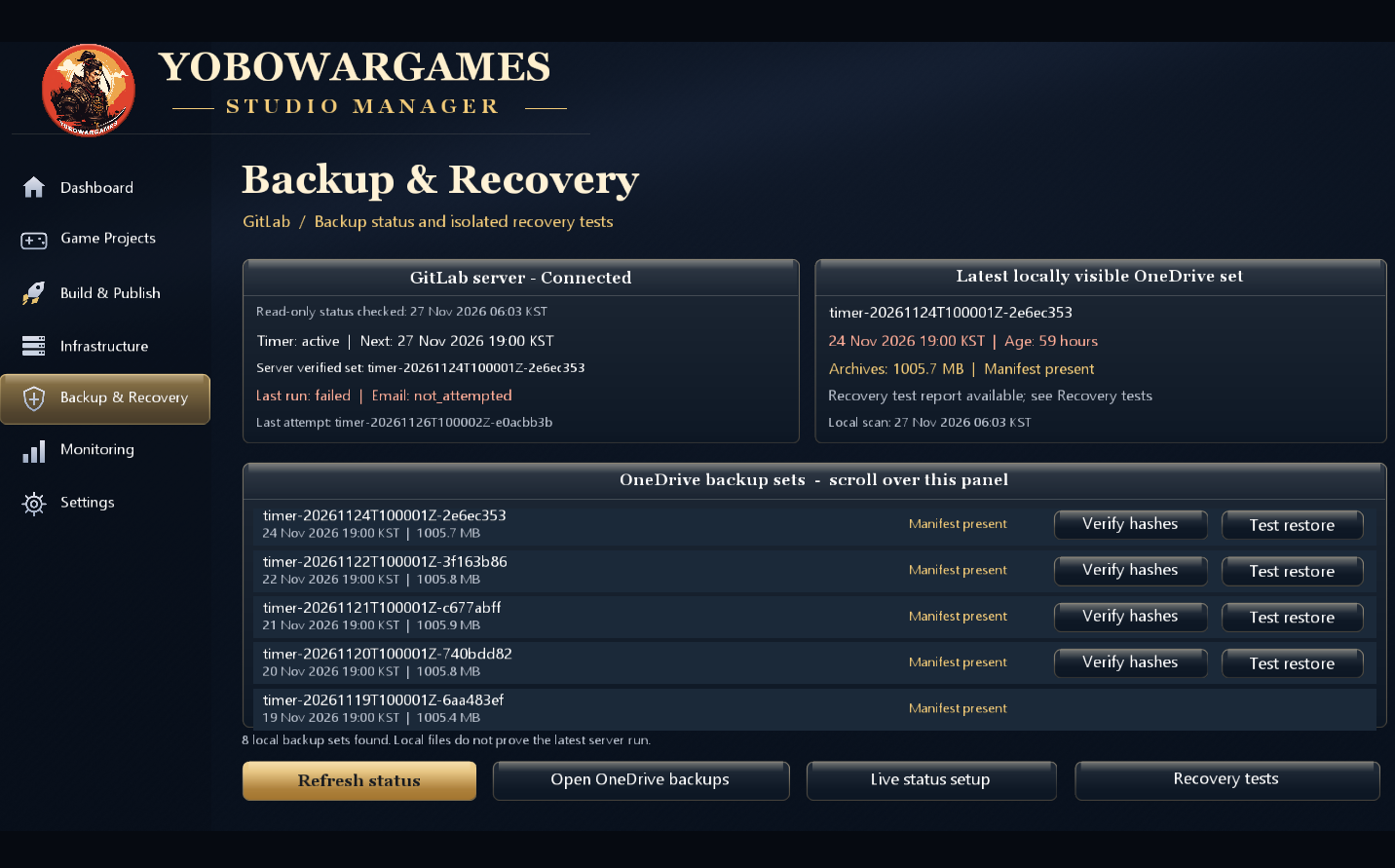
Backups deserve that same visibility. The studio lets me inspect the GitLab backup sets available locally, see their age and size, and verify their checksums. It also brings in server status so I can distinguish the latest backup attempt from the latest verified backup set.
That distinction matters. A scheduled backup and a successful backup are two different things, and I want to be able to see the difference clearly.
There’s also a separate recovery-testing workflow using an isolated virtual machine, helping me work towards confidence that the backups can actually be used.
More room to think about games
The biggest benefit is having fewer things to remember.
Every folder I have to hunt down, every release step I have to reconstruct, and every service I have to check separately takes a little attention away from development. Having a familiar place for those tasks makes it easier to move between projects and pick up where I left off.
There’s something satisfying about giving Yobowargames its own workspace, too. The studio has a visual identity that feels at home alongside the games, while serving a practical purpose every time I open it.
It’s still growing. Some areas are further along than others, and I’ll keep developing it around the jobs that prove useful in everyday work.
That’s why I needed it: to make running Yobowargames easier to manage, give me a clearer view of what’s happening, and leave more of my attention available for making the games.