Up to 16 SP of the same brigade, infantry, or cavalry, may occupy a single hex. Only 8 SP of infantry or cavalry in a hex may participate in combat, attack, or defense, but everything stacked in a hex is affected by any combat results against the hex.
Up to 10 SP of Artillery can occupy a hex in addition to the infantry or cavalry in the hex. If the artillery unit is naturally more than 10 SP by itself, it may occupy the hex, but no additional artillery may be in the hex with it. Artillery may stack together regardless of the formation they belong to: corps, division, etc. Limbered and unlimbered artillery may be in the same stack.
Note that limbered and unlimbered artillery have different strengths. Artillery cannot unlimber if the unlimbered strength would exceed the stacking limit in that hex.
- All cavalry in a stack must be either all mounted or all dismounted. A stack cannot be mixed, mounted, and dismounted.
- Infantry or Cavalry regiments stacked in a hex together are treated as a single unit for combat. Units stacked with other units cannot attack or defend individually. All stacked regiments must attack the same target hex(s), and all defend as a single unit. Combat effects may affect regiments individually, such as cohesion checks or eliminations, whereby regiments act as step losses for their brigades.
- At the end of the phasing player’s movement phase, any of his stacks that violate stacking limits must eliminate SPs in excess of the limits.
Rotating through units in a stack
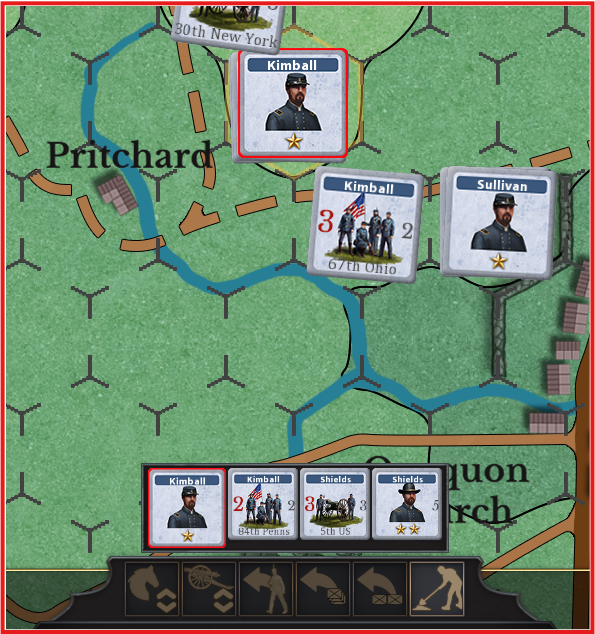
When you click on a stack, the contents of the stack are displayed in the stack display at the bottom of the scene. In the image below, the player has clicked on the stack with Kimball, Shields, 5th Us, and 84th Penns. By continuing to click on the stack, the next unit will move to the top, and an action, such as move, can be performed using that selected unit.
Selected units are marked with a red border.