
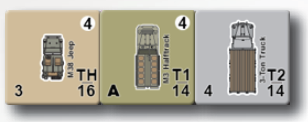
A vehicle or AFV classified as a transport unit may carry infantry units and tow a Gun. A unit being transported is not shown on the map, and is considered a single unit with the transporting unit. Passengers are shown when units are displayed in the hex contents dialog in the battle interface.
Transport Class.
Each transport unit has a Transport Class, indicated by a letter and
number combination (T#) on the unit’s counter above its Movement
Points. The Transport Class indicates the types and number of units
a transport may carry.
Transport Limits.
A transport unit may carry one squad (or two half squads), one leader, and one support weapon per number in the Transport Class rating. For instance, if a transport is a T2, it may carry two squads (or the half-squad equivalents), two leaders, and two support weapons. If the Transport Class is listed as “TH” the unit may only carry a half squad, a leader, and a support weapon. In addition to carrying passengers, a transport unit may also tow a Gun if the unit has a dash below its Transport Class. TH class units may not tow a large Gun (i.e., a Gun with “0” Movement Points).
Loading and Unloading.
An infantry unit or Gun may load onto, or unload from, an adjacent transport vehicle. A unit (both passenger and transport units) may not load and unload in the same turn; each unit may only conduct one load or unload action per turn. A passenger unit may not move before loading, or after unloading. The transport vehicle may move
before or after loading or unloading, but not both before and after loading or unloading.
Loading Units
A player may load units by selecting the load/unload button in the bottom menu of the battle interface. To load successfully the units must be in the same hex as the transport. Units that have already moved may not be loaded.

To load units:
★★ Select the hex
★★ Select the units to load in the Unit Selection Popup
★★ Select the Load Units button in the Bottom Menu of the Battle Interface
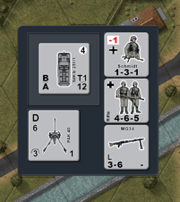
Once loaded, the units will be removed from the map and will now move with the transport. The passengers in a transport can be viewed by right clicking on a transport to display the Hex Contents
Popup.
Unloading Units
A player may unload units from a transport during their move phase. A player may unload any or all units the transport is carrying. Units that have been unloaded may not move in that phase.
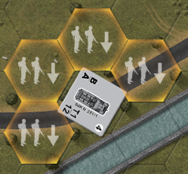
To unload units:
★★ Select the transport
★★ Select the units to unload in the Unit Selection Popup
★★ Select the Unload Units button in the Bottom Menu of the Battle Interface
★★ Select the hex to place the unloading units
Units may not be placed in invalid hexes, such as canals, hexes where they may not normally enter, or in enemy held hexes.
Stacking.
A vehicle transporting a unit is considered one vehicle for stacking purposes.
Combat.
Transport units may fire normally when carrying other units. Infantry units may conduct AP fire while being transported, but not AT fire. Guns may never fire while being transported. When a transport unit is pinned or eliminated, transported units are also pinned or eliminated; they suffer the same fate as the transport unit.


