
Some weapons, such as AFV main guns, guns, and squad AT support weapons (bazooka, Panzerschreck) have both an AP and AT capability. If the player targets a hex with multiple targets that can be attacked by a weapon, they will be asked to select a particular target.
The Target Selection Popup will display the possible targets in the hex. Underneath each target is a weapon round. Clicking on the weapon round selects that target.
In some cases, the same target will be presented, with different color rounds beneath each picture. This indicates that the target can be attacked with both AP and AT attacks. An orange round represents an AP attack and a red round an AT attack.
For example, if the player has a British Firefly AFV and wishes to attack a hex with a German squad and a Flak 36/37 gun, they will see the following Target Selection Popup.
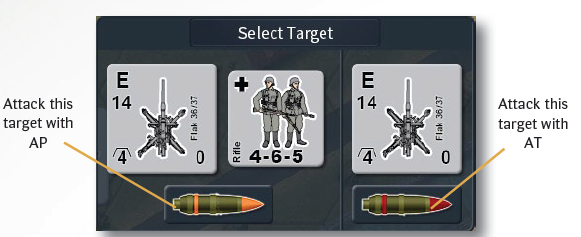
The Firefly may attack with an AP attack or an AT attack. Since AP attacks the entire hex, and both the squad and the gun maybe attacked using AP, together they form one possible target. The gun itself can also be attacked using AT and so it presents another target. The player selects the target they wish to attack by clicking one of the rounds under the preferred target.


