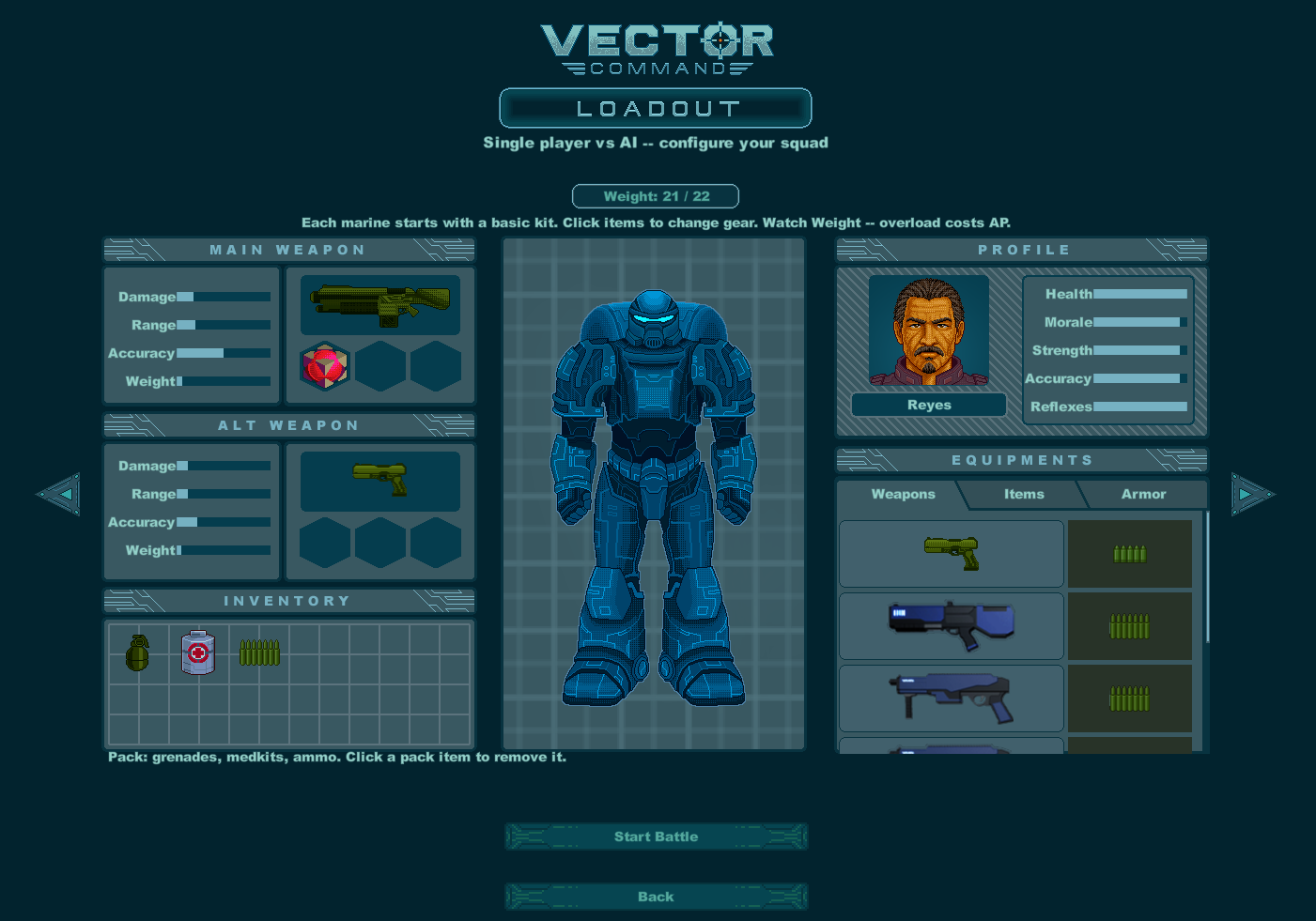
Every battle — campaign, skirmish, or PBEM — starts with loadout.
Steps
1. Select a marine in your squad.
2. Use the gear tabs (Weapons, Ammo, Armor, Items, and similar) to change equipment.
3. Watch Weight: current / max.
Overweight shows as something like Weight: x / y (−z AP) — excess weight costs action points.
Hitting the hard cap blocks adding more gear (Weight limit).
4. Pack slots hold grenades, medkits, and spare ammo. Click a pack item to remove it.
5. When ready:
Start Battle in most modes, or
Continue for Player 1 in hotseat (then Player 2’s loadout, then Start Battle).
Loadout tips
– Every marine starts with a basic kit — customize, don’t ignore weight.
– A lighter marine with full AP often outperforms a walking arsenal with crippled AP.
– Bring the right tools: rifles for open fights, pistols/sidearms as backup, grenades for rooms and denial, medkits for recovery.
– Ammo in the pack only helps if you reload during battle — budget AP for that.


